Odin Cp Slot
Samsung FRP lock can’t be unlocked in any of the Professional Software boxes directly. Some models can be directly unlocked which accounts 5-10 percent of all samsung android phones.
1- What is combination files?
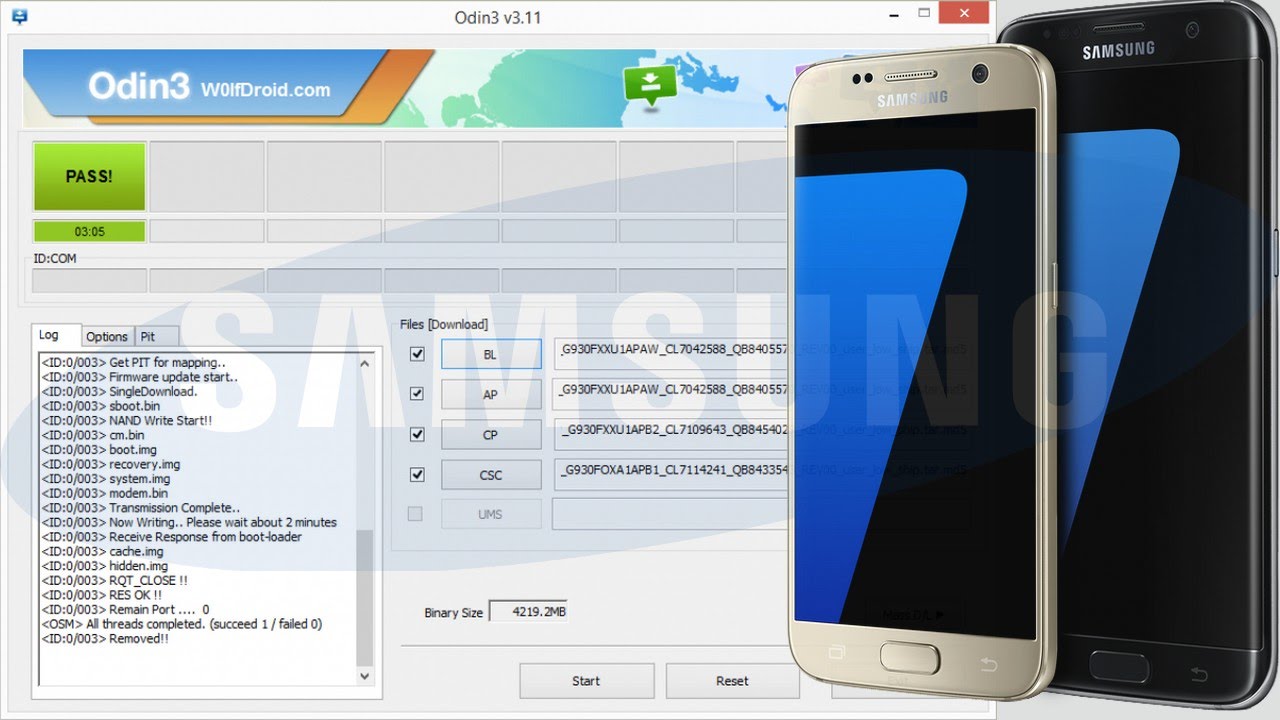
- Wait until you get a blue sign in Odin. Add the files to BL - AP - CP - CSC; Do NOT tick any extra boxes. The only options to be ticked are F.Reset Time and Auto-Reboot. Click the start button, wait for Odin to say 'PASS' in a GREEN box. Once the flash is complete, your phone will reboot, and you can disconnect your phone from the PC.
- If there is only one file, then add it into the AP slot. Otherwise, add to the Odin sections appropriately. Like BL for BL, AP for AP, CP for CP, CSC for CSC (not HOMECSC). Now under the options tab make sure that only “Auto Reboot” and “F. Reset Time” are selected.
- Download the zip file and extract it. Go to the extracted folder and double-click on “Odin3 v3.13.1.exe” file. This will launch the new Odin software. If you have already downloaded the firmware, put the respective files on the available slots (BL, AP, CP, CSC), put the phone to download mode, connect it to the PC and start flashing.
- Add Bootloader in BL and Modem in CP slots and flash it via Odin (Check How to flash Bootloader/Modem files via Odin ) So this the easiest way to Download and install Android Oreo beta on Galaxy S8 plus Exynos variants. Apr 10, 2017 Galaxy S8 Download mode.
Connect you Samsung Phone and wait until you get a BLUE sign in Odin. Add the 1 file Samsung firmware to AP/PDA or 4 files Samsung firmware (AP/BL/CP/CSC) to it's slots. Do NOT tick any extra boxes. The only options to be ticked are F.Reset Time and Auto-Reboot. Click the start button, wait for Odin to say 'PASS' in a GREEN sign.

Samsung Combination files are raw program which is used for testing purpose for Services & to get more info of the device.
2- Why Combination files are required to unlock FRP?
To unlock FRP in Samsung phones, USB debugging has to be enable. Earlier, with Android OS 6.0 & 7.0 Talkback method was used to enable USB debugging. But with higher android version talkback method fails to enable USB Debugging.
By Flashing combination files, USB debugging get enabled and the display shows the Factory mode.
Note: If in developer mode there is OEM, it also has to be enabled.

3- How to Flash Combination Files?
Samsung combination files can be flashed using Odin tool. The file has to be selected in AP/PDA section of odin tool and phone has to connected in Download mode using Power + Volume Down + Menu and in some phones by holding both volume keys and connecting USB cable like in SM-J600g.
Steps to Unlock FRP using Combination Files:
1- Download Odin tool & Install Samsung kies.
2- Download Samsung combination files, if you model no is not in the list. Let us know in the comment.
2- Run odin tool.
3- Select Combination Files in AP/PDA.
4- Switch off your Samsung Phone. Switch on the mobile by pressing (Power+Volume down+Menu). Phone will boot in Download mode.
5- Press Volume UP to enter in Download mode. Then connect it to PC using USB Cable.
6- Click on Start to flash.
7- After Flashing phone will be in factory mode. Make sure to enable USB Debugging and if there is OEM Lock then enable it also.
If there is any Professional Box like UMT, Miracle etc. Then unlock FRP using ADB mode.
Note: Phone should be connected in ON mode to unlock FRP using Umt or Miracle.
After FRP Lock has been unlocked. Now, its time to Flash the phone with stock Firmware.
Samsung Flashing using Odin:
1- Download Samsung Stock ROM. You can also use Custom search of RepairMyMobile.
2- Connect phone in Download mode.
3- Select Files in Odin tool & then flash.
Note: After FRP has been locked. Make sure to do a Factory Data Reset in Setting.
More from my site
Samsung FRP lock can’t be unlocked in any of the Professional Software boxes directly. Some models can be directly unlocked which accounts 5-10 percent of all samsung android phones.
1- What is combination files?
Samsung Combination files are raw program which is used for testing purpose for Services & to get more info of the device.
2- Why Combination files are required to unlock FRP?
To unlock FRP in Samsung phones, USB debugging has to be enable. Earlier, with Android OS 6.0 & 7.0 Talkback method was used to enable USB debugging. But with higher android version talkback method fails to enable USB Debugging.
By Flashing combination files, USB debugging get enabled and the display shows the Factory mode.
Note: If in developer mode there is OEM, it also has to be enabled.
3- How to Flash Combination Files?
Samsung combination files can be flashed using Odin tool. The file has to be selected in AP/PDA section of odin tool and phone has to connected in Download mode using Power + Volume Down + Menu and in some phones by holding both volume keys and connecting USB cable like in SM-J600g.
Steps to Unlock FRP using Combination Files:
1- Download Odin tool & Install Samsung kies.
2- Download Samsung combination files, if you model no is not in the list. Let us know in the comment.
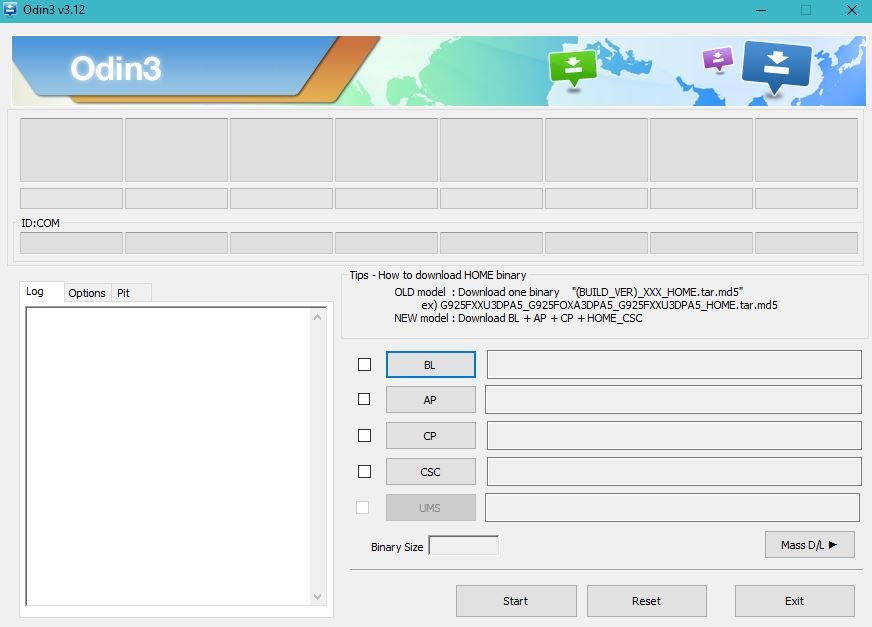
2- Run odin tool.
3- Select Combination Files in AP/PDA.
4- Switch off your Samsung Phone. Switch on the mobile by pressing (Power+Volume down+Menu). Phone will boot in Download mode.
5- Press Volume UP to enter in Download mode. Then connect it to PC using USB Cable.
6- Click on Start to flash.
7- After Flashing phone will be in factory mode. Make sure to enable USB Debugging and if there is OEM Lock then enable it also.
If there is any Professional Box like UMT, Miracle etc. Then unlock FRP using ADB mode.
Odin Clothing Company
Note: Phone should be connected in ON mode to unlock FRP using Umt or Miracle.
After FRP Lock has been unlocked. Now, its time to Flash the phone with stock Firmware.
Samsung Flashing using Odin:
1- Download Samsung Stock ROM. You can also use Custom search of RepairMyMobile.
Odin Pda Slot
2- Connect phone in Download mode.
3- Select Files in Odin tool & then flash.
Note: After FRP has been locked. Make sure to do a Factory Data Reset in Setting.